
Why Choose TNG Scan QR for Top Ups at LUCKYTOWN PLUS?
Fast and Convenient QR Code Deposits for LUCKYTOWN PLUS Members
LUCKYTOWN PLUS offers TNG Scan QR as a fast and highly convenient method to top up your account. Simply scan the QR code with your Touch N Go e-wallet, complete the transfer, and your funds will be processed quickly. TNG Scan QR at LUCKYTOWN PLUS supports multiple payment methods, including UPay and Go Pay.
Quick Processing Within 15 Minutes at LUCKYTOWN PLUS
Your deposits are processed promptly by the LUCKYTOWN PLUS system. Most transactions are completed within minutes, and you will receive a confirmation once your funds are credited. If payment is not received within 15 minutes, our dedicated customer support is ready to assist you promptly.
Secure Transactions with LUCKYTOWN PLUS
TNG Scan QR at LUCKYTOWN PLUS uses secure QR code technology to ensure all your transactions are safe. Always scan the official QR code displayed directly in the LUCKYTOWN PLUS app and complete your payment promptly to ensure a smooth process.
Two TNG Scan QR Options Available at LUCKYTOWN PLUS

Option 1: UPay TNG at LUCKYTOWN PLUS
LUCKYTOWN PLUS supports UPay as one of the primary TNG Scan QR payment methods. Simply follow the UPay-specific steps outlined below for a smooth and seamless deposit experience.
Option 2: Go Pay TNG at LUCKYTOWN PLUS
Go Pay is another convenient TNG Scan QR option available at LUCKYTOWN PLUS. The process includes a simple step of filling in your trading account name before scanning the QR code, as detailed in the guide below.
Step-by-Step Guide to TNG Scan QR Top Up at LUCKYTOWN PLUS

UPay TNG Scan QR – Detailed Step-by-Step
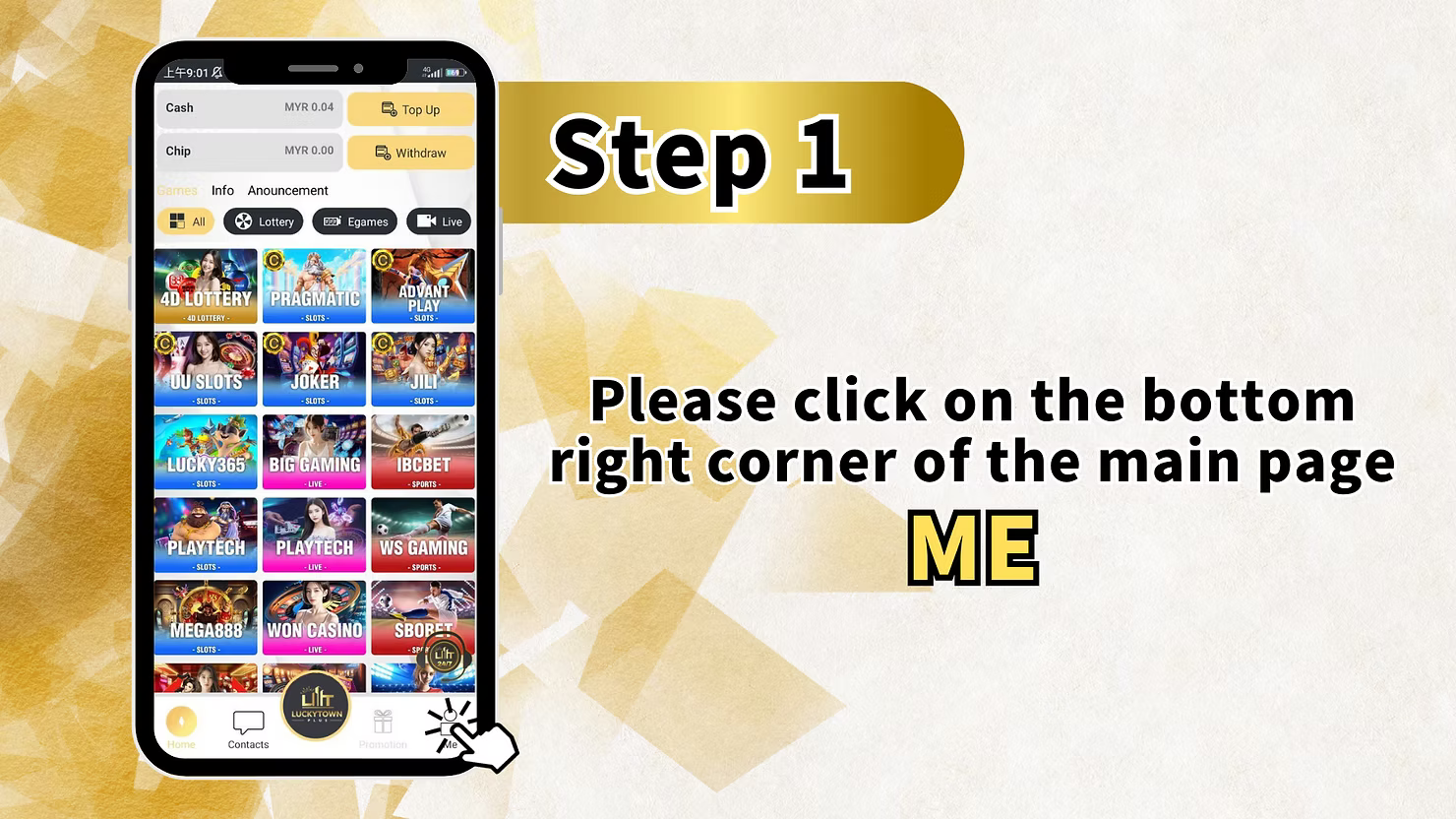
Step 1: Access Your LUCKYTOWN PLUS Account
Open the LUCKYTOWN PLUS app on your mobile device. On the main page, locate the bottom right corner and tap on "ME" to access your personal account dashboard.
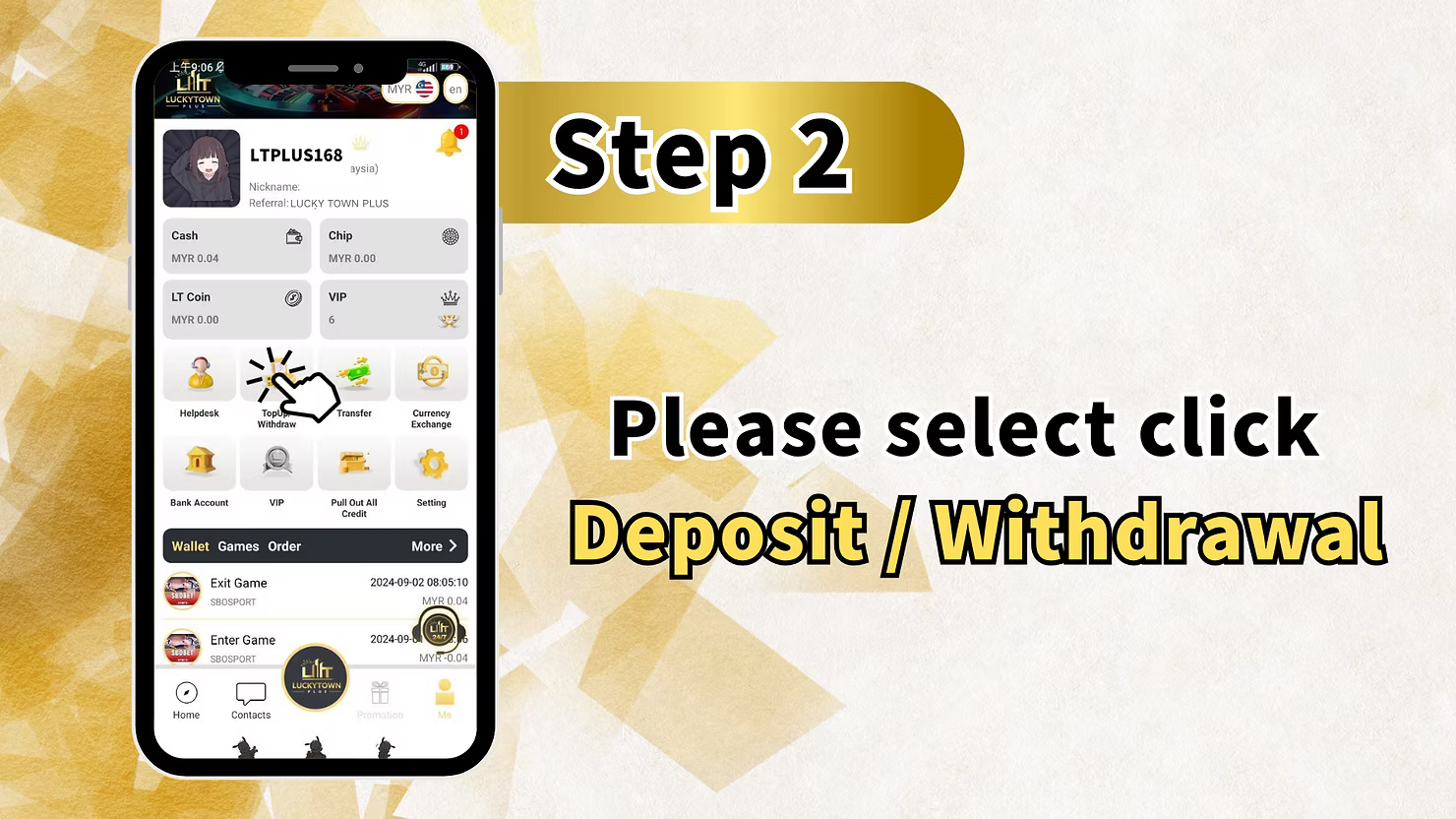
Step 2: Navigate to Deposit/Withdrawal
From the "ME" menu, tap on "Deposit / Withdrawal". This will take you to the funds management page, the central hub for managing your financial transactions at LUCKYTOWN PLUS.
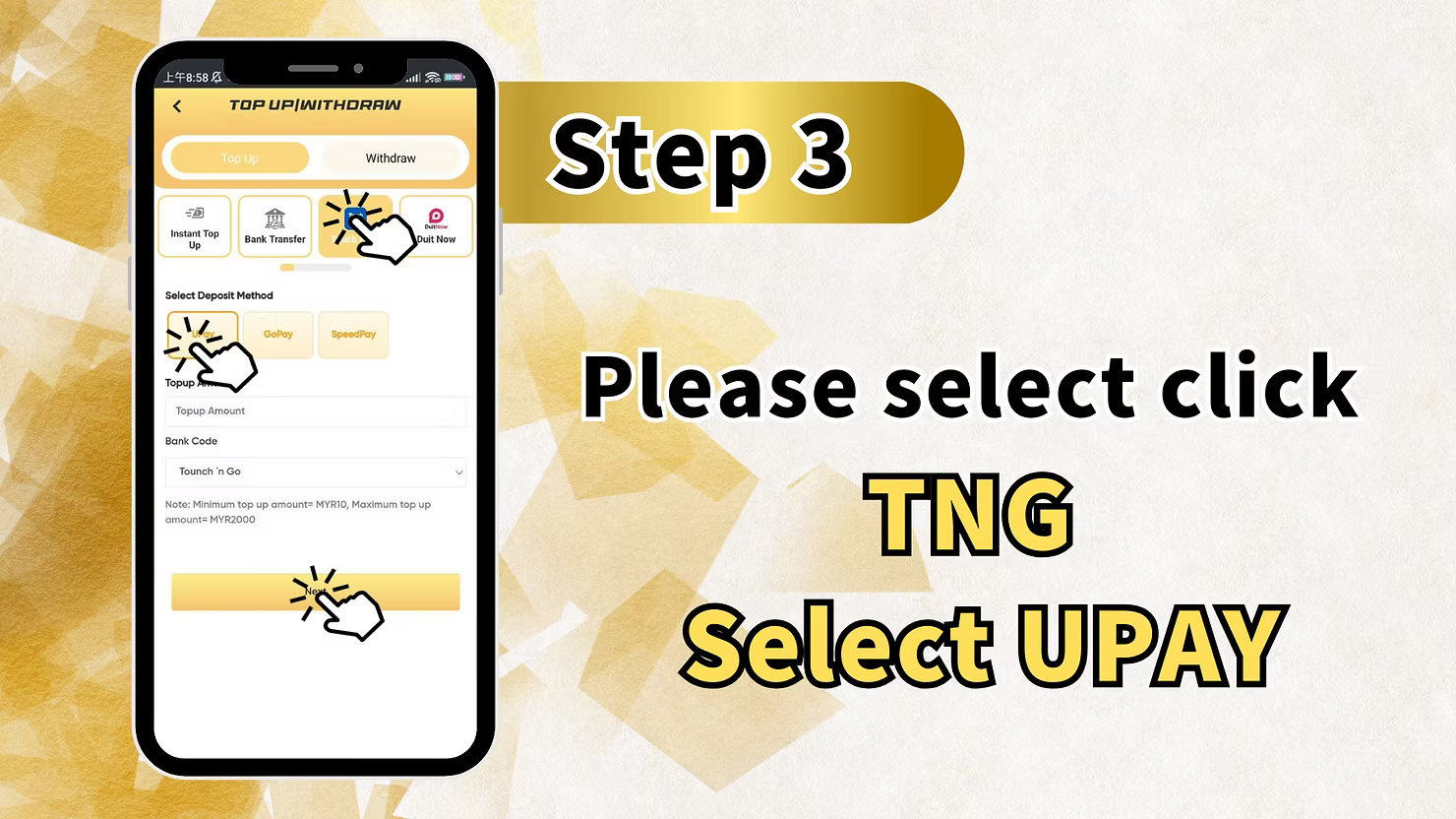
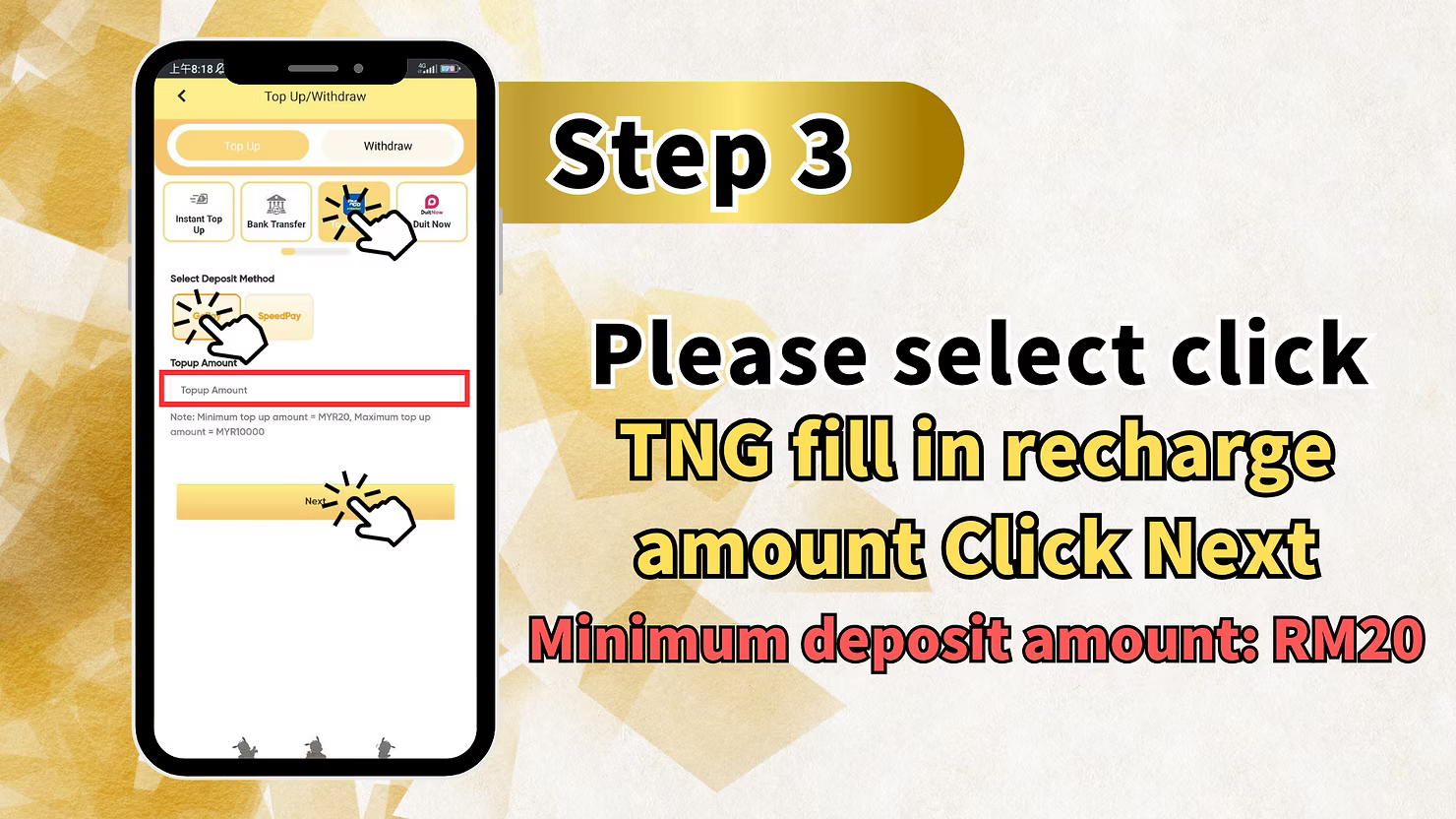
Step 3: Select TNG and Choose UPay
On the deposit methods page, select the "TNG" (Touch N Go) option. Then, from the provider list, choose "UPay" as your preferred payment provider for this transaction.
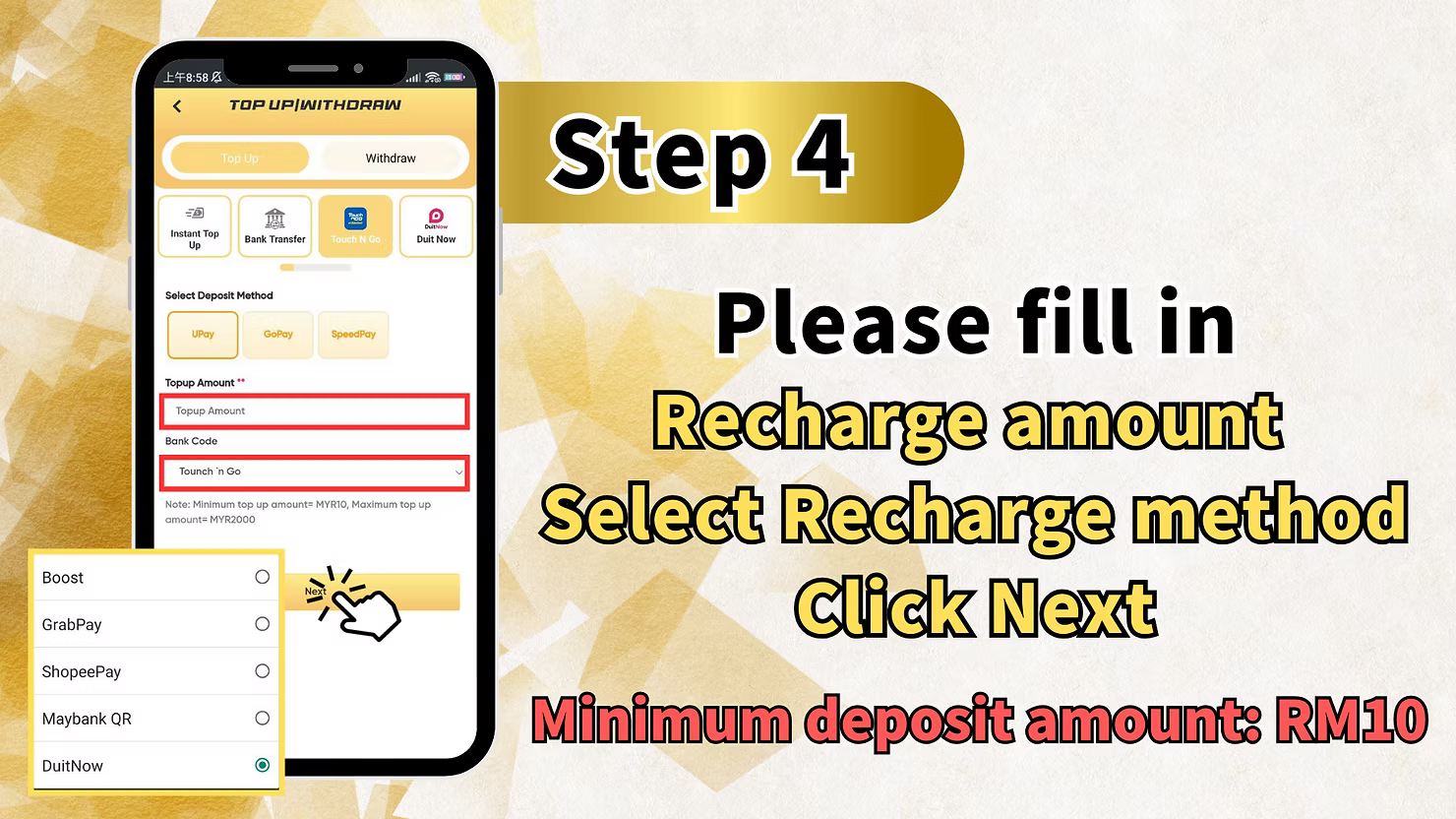
Step 4: Enter Your Deposit Amount
Fill in the "Withdraw amount" or deposit amount field with the sum you wish to transfer to your LUCKYTOWN PLUS account. Select the correct amount and tap "Next" to proceed.
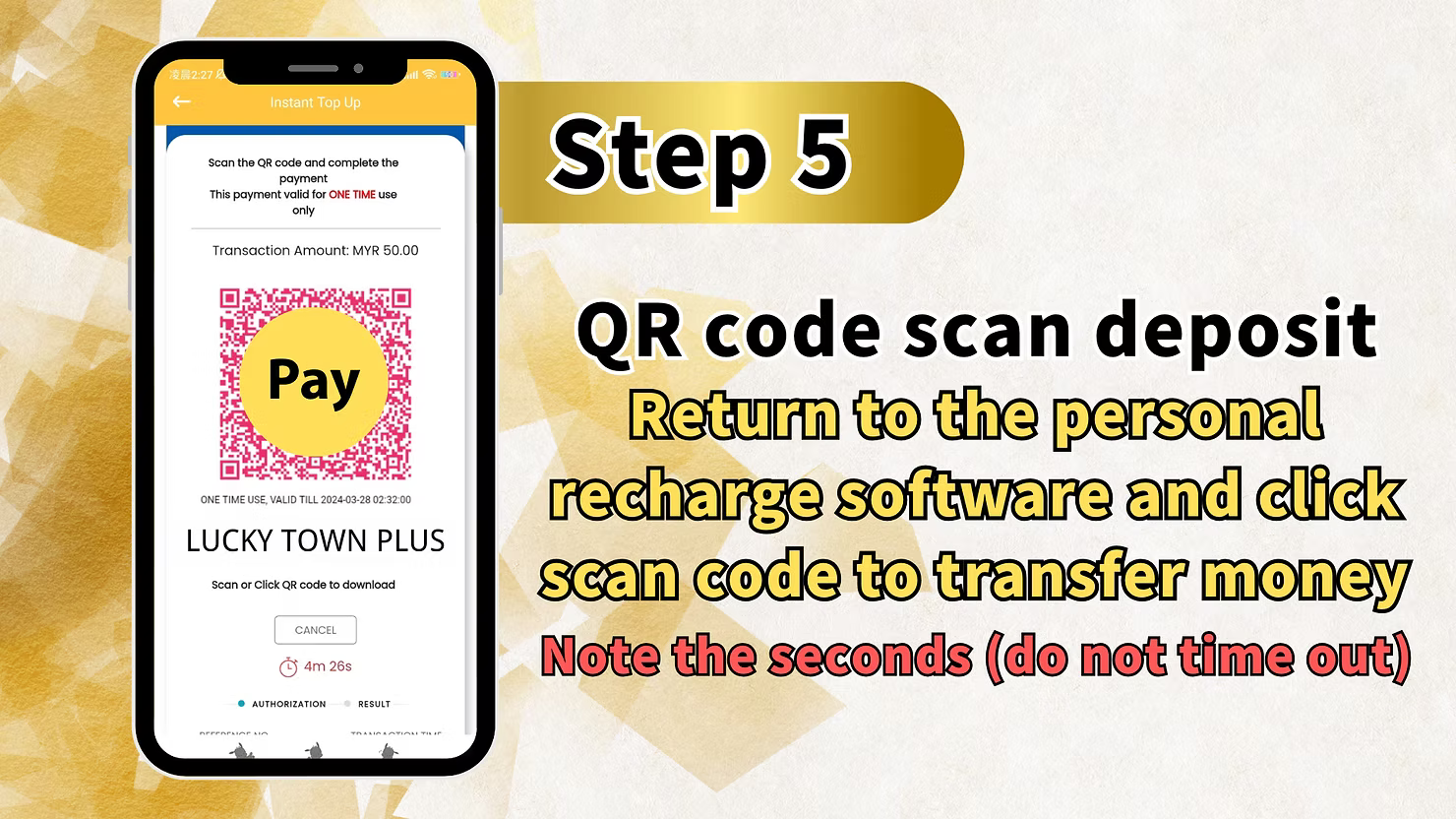
Step 5: Scan QR Code and Complete Payment
LUCKYTOWN PLUS will now display a unique QR code specifically for your transaction. Open your Touch N Go e-wallet or UPay app, use its scan function to scan the QR code, and complete the transfer.
Important Note: Pay close attention to any timer displayed on the screen – do not let the QR code time out. Complete your scan and payment promptly. After a successful scan, tap "Pay" in your payment app to finalize the transaction.
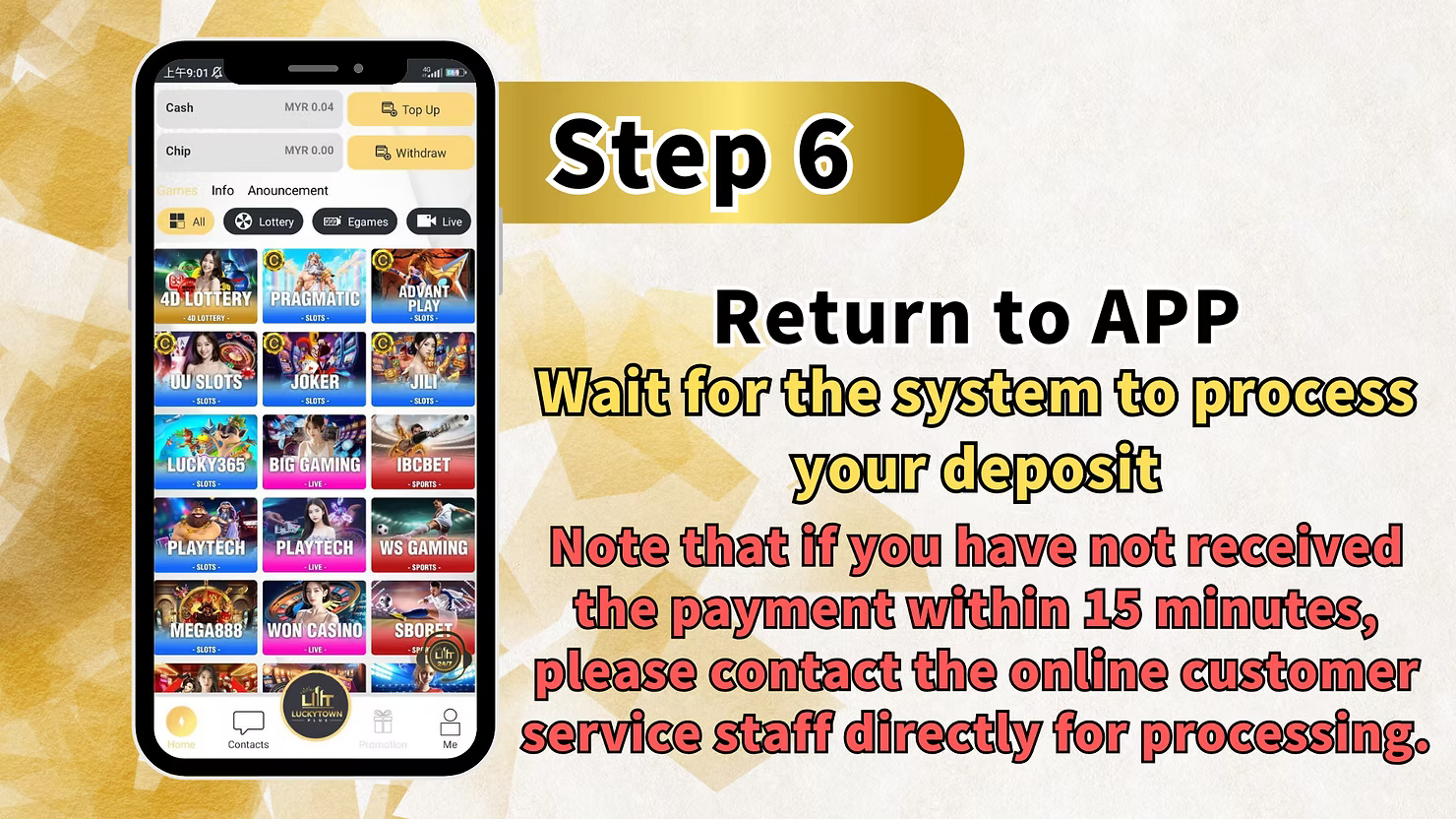
Step 6: Return to LUCKYTOWN PLUS and Wait for Processing
After successfully completing the payment in your app, return to the LUCKYTOWN PLUS app. Wait for the system to automatically process your deposit.
Note: If you have not received confirmation of your payment being credited within 15 minutes, please contact our online customer service directly for immediate assistance. Our support team is ready to help resolve any deposit issues.
Go Pay TNG Scan QR – Detailed Step-by-Step
Step 1: Access Your LUCKYTOWN PLUS Account
Open the LUCKYTOWN PLUS app. On the main page, tap the bottom right corner to access your account menu and dashboard.
Step 2: Navigate to Deposit/Withdrawal
Select "Deposit / Withdrawal" from the menu to access the funds management page for your LUCKYTOWN PLUS account.
Step 3: Select TNG and Choose Go Pay
Choose the "TNG" option from the deposit methods. Then, select "Go Pay" as your payment provider. You may see an option like "TNG fill in deposit / withdraw" – please select this.
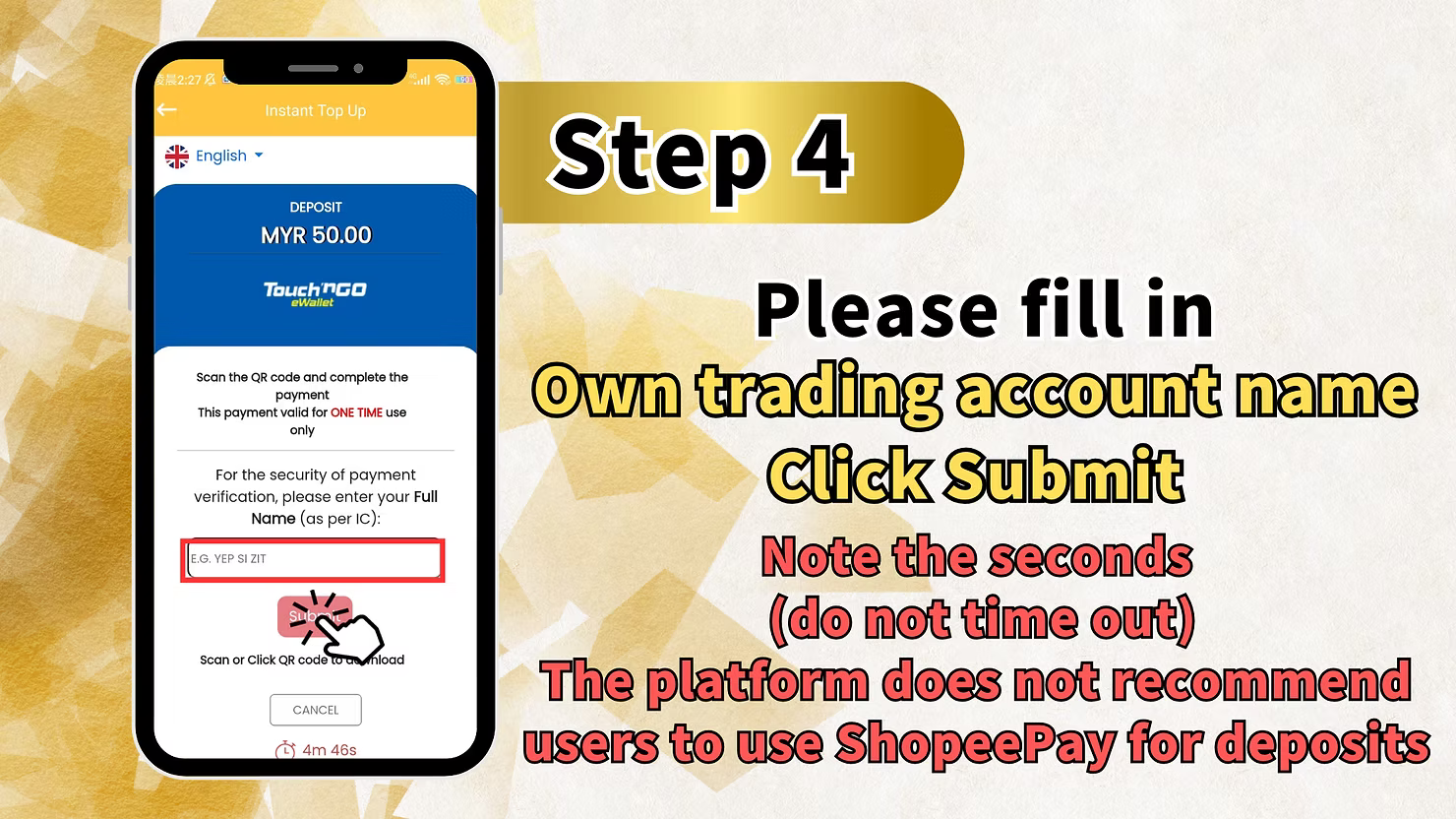
Step 4: Fill in Your Trading Account Name
Before scanning the QR code, you will need to fill in your trading account name in the provided field. Entering this information accurately helps verify your identity for the secure transaction at LUCKYTOWN PLUS.
Step 5: Submit and Scan QR Code
After filling in your account name, tap "Submit". LUCKYTOWN PLUS will then generate a unique QR code for your deposit. Scan this QR code with your Touch N Go e-wallet or Go Pay app to deposit funds. Complete the payment as instructed within your payment app.
Step 6: Return to LUCKYTOWN PLUS and Wait for Processing
Return to the LUCKYTOWN PLUS app after successfully completing the payment. The system will automatically process your deposit.
Note: If you have not received your funds within 15 minutes, or if you encounter any issues within the app during the process, please contact our online customer service directly for prompt processing and assistance.
Summary of TNG Scan QR Top Up Steps at LUCKYTOWN PLUS
Quick Reference Checklist for LUCKYTOWN PLUS Members
Here is a quick summary of TNG Scan QR top-up options at LUCKYTOWN PLUS for your easy reference:
For UPay TNG:
- Tap ME (bottom right).
- Select Deposit / Withdrawal.
- Choose TNG and select UPay.
- Enter amount and tap Next.
- Scan QR code and tap Pay (avoid timeout).
- Return to app, wait ≤15 minutes, contact support if needed.
For Go Pay TNG:
- Tap bottom right to access account.
- Select Deposit / Withdrawal.
- Choose TNG and select Go Pay.
- Fill in your trading account name accurately.
- Tap Submit and scan the QR code.
- Return to app, wait ≤15 minutes, contact support if issues arise.
Important Notes for Successful TNG Scan QR Top Up at LUCKYTOWN PLUS
Always Avoid QR Code Timeout
QR codes displayed by LUCKYTOWN PLUS have a limited validity period for security. Pay close attention to any timer displayed on the screen and complete your scan and payment promptly. If the code expires, you will need to generate a new one by restarting the deposit process.
Adhere to the 15-Minute Processing Window
Most deposits are processed within minutes. However, as a standard guideline, if you have not received confirmation of your payment within 15 minutes, please contact LUCKYTOWN PLUS online customer service immediately for assistance.
Provide Accurate Account Information
For Go Pay transactions, it is essential that you enter your correct trading account name before submitting. Providing inaccurate information may delay the processing of your deposit.
Use Only Official Apps for Security
Always use the official LUCKYTOWN PLUS app and your legitimate, official e-wallet apps (Touch N Go, UPay, Go Pay) for making deposits. Avoid using any third-party or unofficial apps to protect your financial security and personal information.
Frequently Asked Questions About TNG Scan QR Top Up at LUCKYTOWN PLUS
What is TNG Scan QR?
TNG Scan QR refers to using your Touch N Go e-wallet to scan a QR code for making payments. LUCKYTOWN PLUS accepts TNG Scan QR deposits through UPay and Go Pay for a convenient and fast funding experience.
How long does TNG Scan QR processing take at LUCKYTOWN PLUS?
Most deposits are processed within minutes. As a general guideline, if your payment has not been credited after 15 minutes, please contact our customer support for assistance.
What should I do if my TNG Scan QR code expires?
If your QR code times out, simply generate a new one by starting the deposit process again from the beginning. Be sure to complete the scan and transfer promptly the second time to avoid another timeout.
What information is needed for Go Pay TNG deposits?
For Go Pay TNG deposits at LUCKYTOWN PLUS, you will need to enter your trading account name accurately in the provided field before the QR code is generated. This step helps verify your identity.
What if my deposit isn't credited after 15 minutes?
If your deposit is not credited to your LUCKYTOWN PLUS account within 15 minutes of completing the payment, please contact our online customer service immediately. Our support team will investigate and resolve the issue for you.
Is TNG Scan QR a secure payment method?
Yes, TNG Scan QR is a secure and widely used payment method in Malaysia. Combined with LUCKYTOWN PLUS's own security measures, your transactions are well-protected. Always ensure you are using the official apps and following the proper procedures.
Can I use both UPay and Go Pay for TNG deposits?
Yes, LUCKYTOWN PLUS proudly supports both UPay TNG and Go Pay TNG. You can choose the option that works best with the e-wallet you have available.
What does "ME" refer to in the instructions?
"ME" refers to the profile or account section of the LUCKYTOWN PLUS app, which you can access by tapping the icon in the bottom right corner of the main screen.
Who do I contact if I have issues with the LUCKYTOWN PLUS app during deposit?
If you encounter any issues with the LUCKYTOWN PLUS app during the deposit process, please contact our online customer service directly through the app's Helpdesk for immediate assistance.
Top Up with TNG Scan QR at LUCKYTOWN PLUS Today!
Ready to play? Follow our comprehensive step-by-step TNG Scan QR guide to top up your LUCKYTOWN PLUS account now. Enjoy fast QR code deposits with UPay or Go Pay, quick processing within minutes, and dedicated customer support if needed. Start enjoying all your favorite games instantly!
Top Up with TNG Scan QR at LUCKYTOWN PLUS