
Convenient In-App Currency Conversion for LUCKYTOWN PLUS Members
LUCKYTOWN PLUS offers a built-in currency exchange feature that allows you to easily convert between Malaysian Ringgit (MYR) and Thai Baht (THB) directly within the app. Whether you are traveling, sending funds, or managing your account across different regions, this feature provides a seamless and integrated solution within the LUCKYTOWN PLUS ecosystem.
Competitive and Transparent Exchange Rates at LUCKYTOWN PLUS
The exchange rate displayed during your transaction is competitive and fully transparent. You will see the exact rate applied before you confirm, ensuring you know precisely how much you will receive in your target currency, with no hidden surprises.
Two-Way Conversion Support at LUCKYTOWN PLUS
LUCKYTOWN PLUS supports currency conversion in both directions – MYR to THB and THB to MYR. By accessing the appropriate version of the app (Malaysia or Thai), you can easily manage your funds in the currency you need.
Step-by-Step Guide to Currency Exchange at LUCKYTOWN PLUS

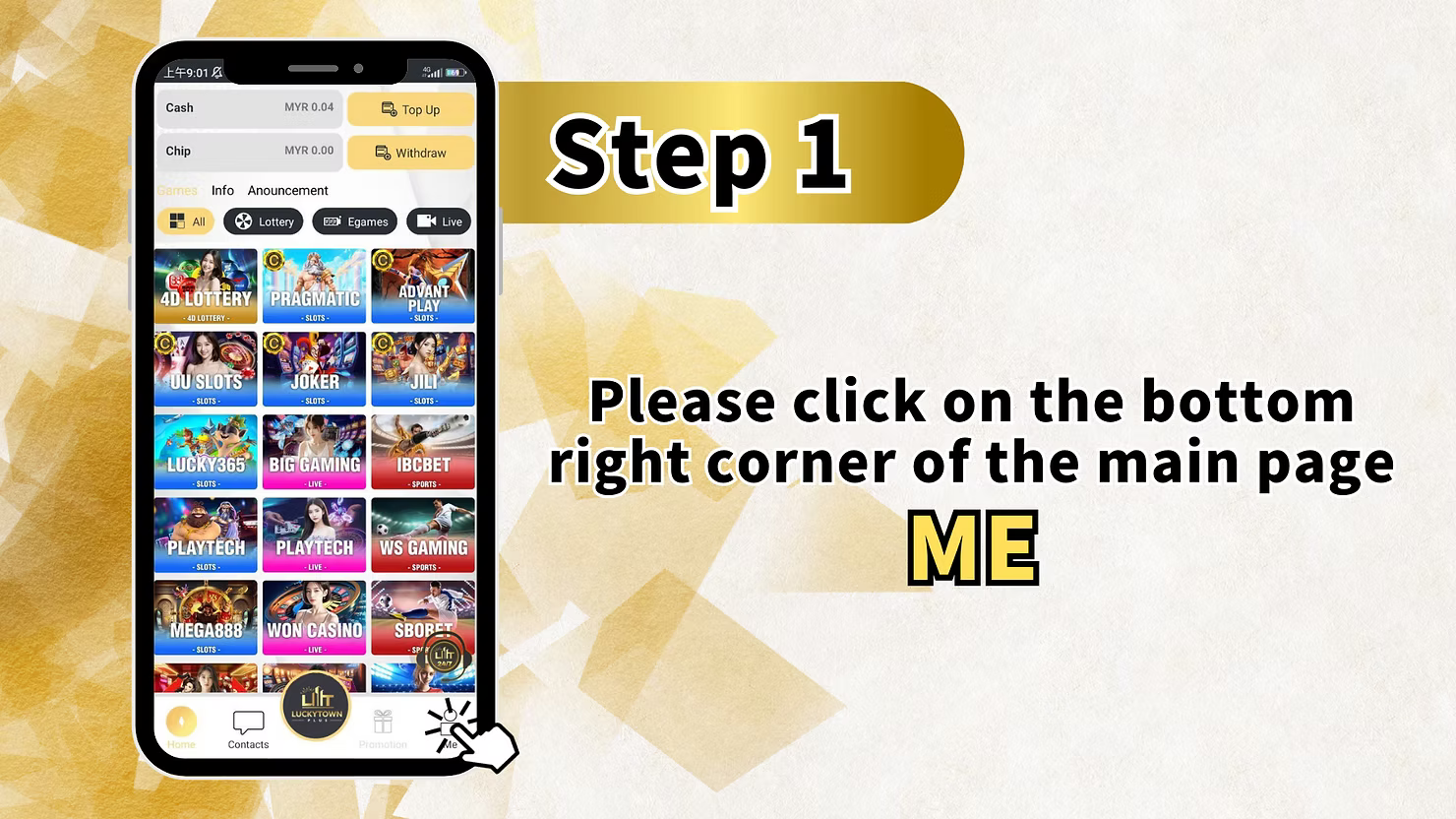
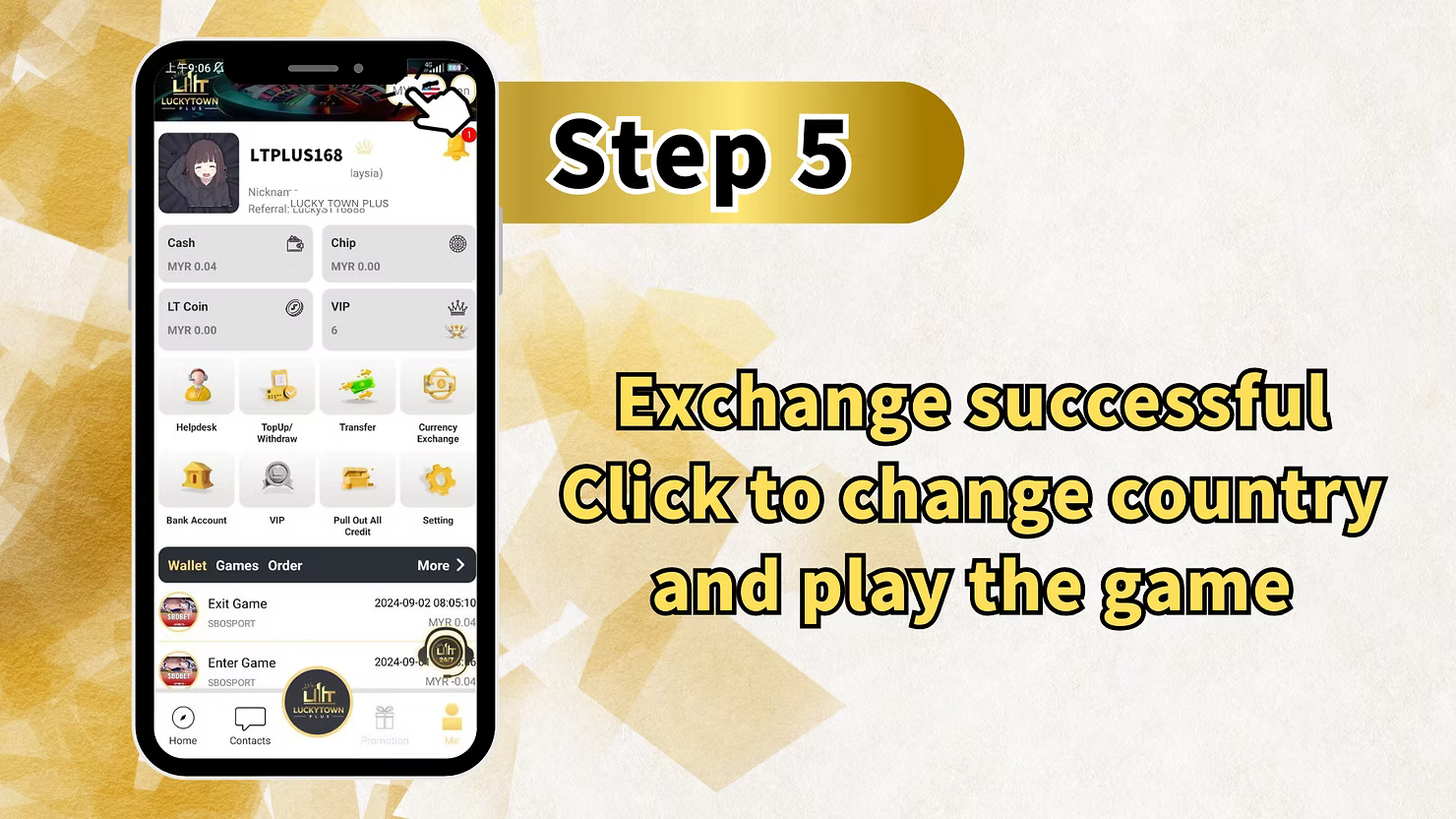
Step 1: Access Your LUCKYTOWN PLUS Account
Tap on "ME" in the Bottom Right Corner
Open the LUCKYTOWN PLUS app on your mobile device. On the main page, locate the bottom right corner and tap on "ME" to access your personal account dashboard. This is your central hub for all account management tasks, including currency exchange.
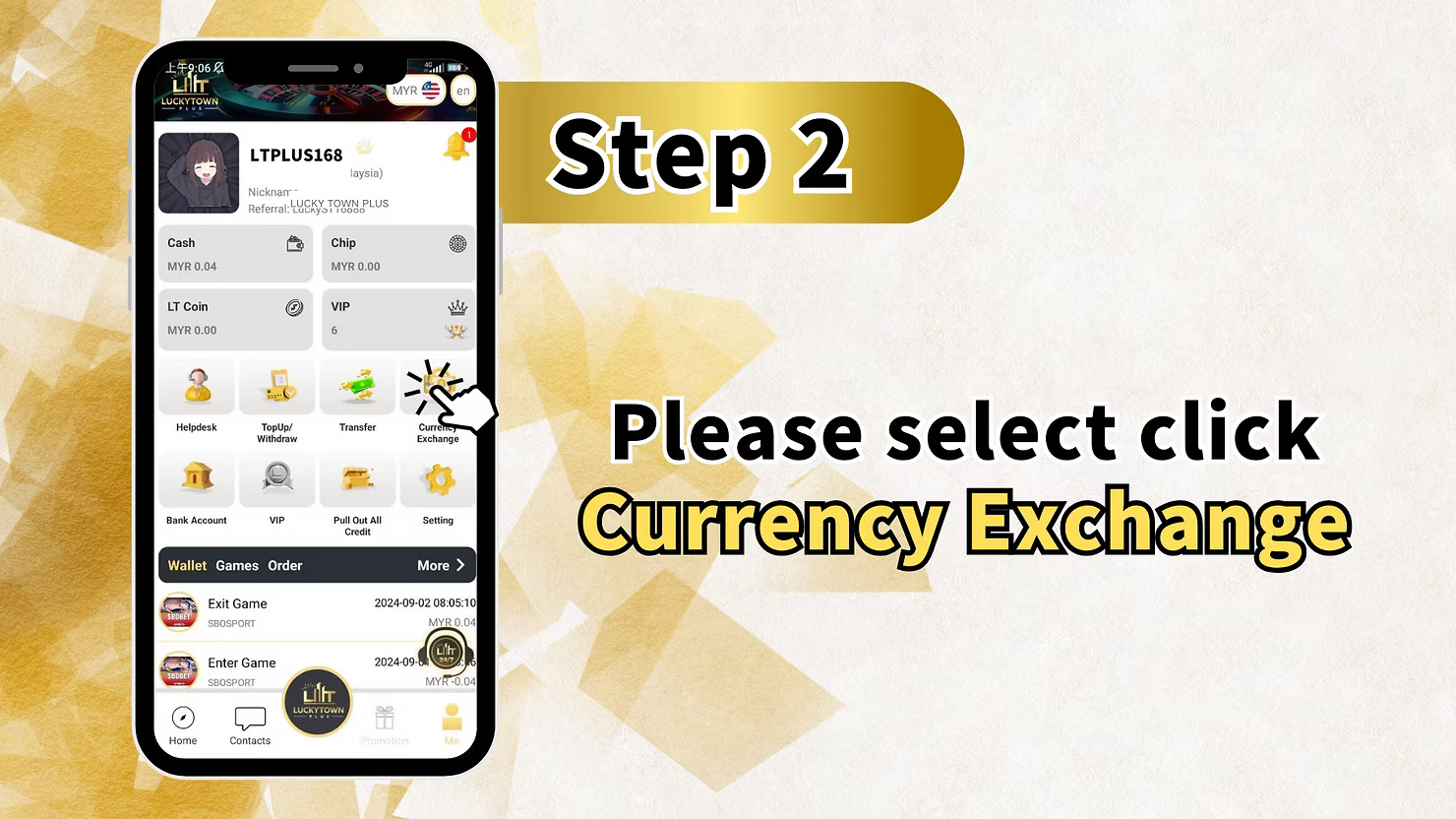
Step 2: Navigate to the Currency Exchange Feature
Select "Currency Exchange" from the Menu
From the "ME" menu, look for and tap on "Currency Exchange". This will take you directly to the currency conversion page, where you can exchange between MYR and THB.
Step 3: Understand the Currency Exchange Interface
Review the Exchange Rate and Fields
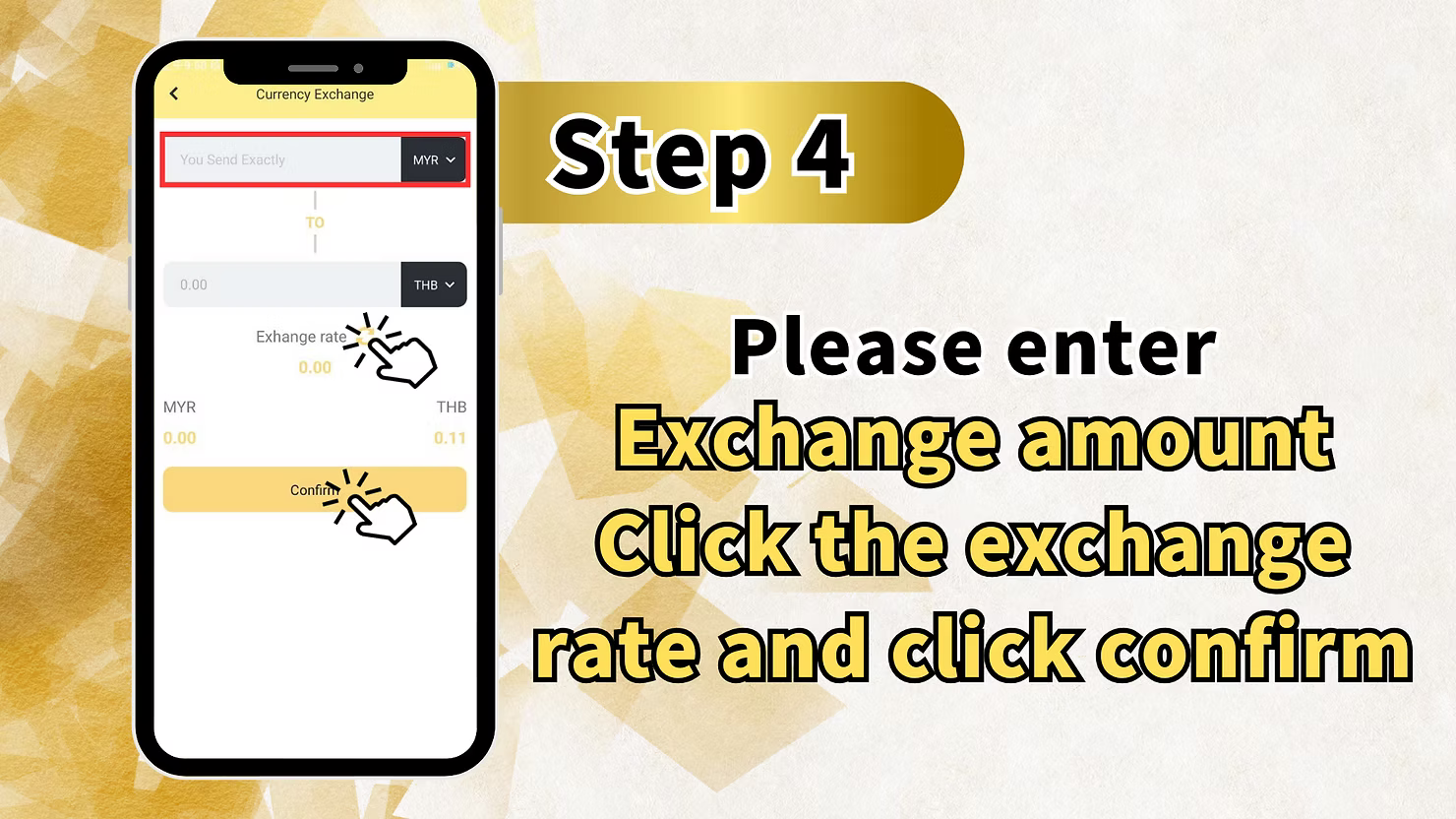
On the Currency Exchange page, you will see a clear and simple interface with the following key elements:
- You Send Exactly: The field for the currency you are converting from (source currency).
- TO: The field for the currency you are converting to (target currency).
- Exchange rate: The current conversion rate between MYR and THB is prominently displayed.
- Amount fields: Dedicated fields where you enter the amount you wish to convert.
The interface is designed to clearly show both currencies and the live exchange rate.
Step 4: Enter the Amount You Wish to Exchange
Specify the Amount to Convert
Enter the amount you wish to exchange in the appropriate source currency field. As you type, the converted amount in the target currency will update automatically and in real-time based on the displayed exchange rate.
For example, if converting MYR to THB:
- Enter the MYR amount you wish to convert.
- The equivalent amount in THB will be calculated and displayed instantly.
You can also tap on the displayed exchange rate to view more details, if such a feature is available in the current version.
Step 5: Review the Details and Confirm Your Exchange
Verify All Exchange Details
Before finalizing the transaction, take a moment to carefully review all the details on the screen:
- Source currency and amount: (e.g., MYR 0.00)
- Target currency and amount: (e.g., THB 0.00)
- Exchange rate applied: Ensure you have seen and agree to the rate.
Tapping on the exchange rate and then confirming is a good practice to ensure you have acknowledged the current rate.
Tap "Confirm" to Complete the Exchange
Once you have verified that all the details are correct, tap the "Confirm" button to complete your currency exchange transaction at LUCKYTOWN PLUS.
Important Notes for Currency Exchange at LUCKYTOWN PLUS
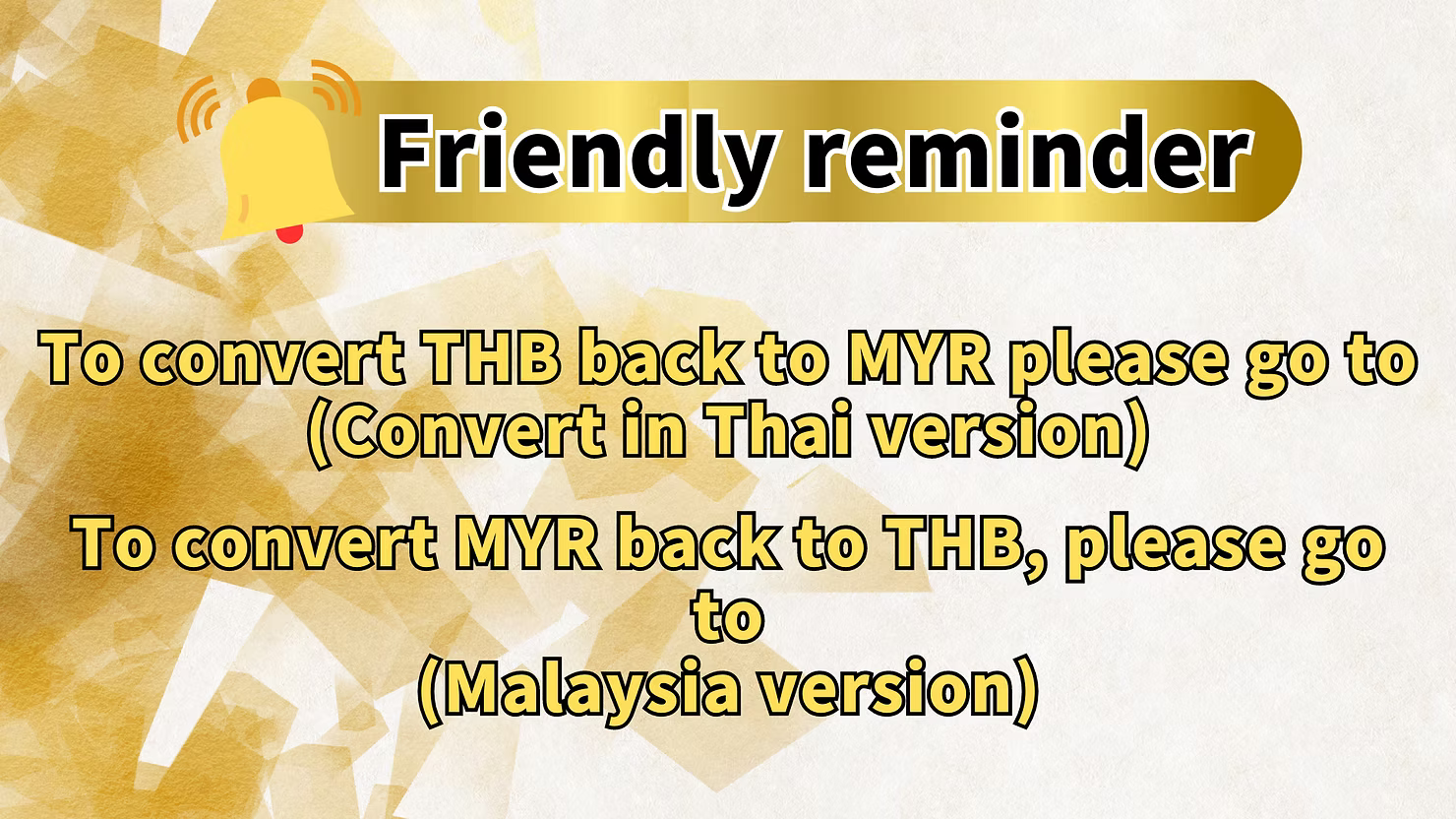
Two-Way Conversion Information for LUCKYTOWN PLUS Users
LUCKYTOWN PLUS provides a friendly reminder about performing two-way currency conversion:
- To convert THB back to MYR, please ensure you are using the Thai version of the app or the appropriate currency exchange interface for that direction.
- To convert MYR back to THB, please ensure you are using the Malaysia version of the app or the corresponding interface.
This ensures you are using the correct regional settings for your desired conversion direction, making the process smooth and error-free.
Exchange Rate Updates at LUCKYTOWN PLUS
Exchange rates are updated regularly based on prevailing market conditions. The rate that is displayed on your screen at the moment you tap "Confirm" is the final rate that will be applied to your transaction.
Summary of Currency Exchange Steps at LUCKYTOWN PLUS
Quick Reference Checklist for LUCKYTOWN PLUS Members
Here is a quick summary of the currency exchange process at LUCKYTOWN PLUS for your easy reference:
- Tap ME (bottom right corner).
- Select Currency Exchange.
- Review the exchange interface and the current MYR ↔ THB rate.
- Enter the amount to exchange in the source currency field.
- Review the converted amount and the applied exchange rate.
- Tap Confirm to complete the exchange instantly.
- For reverse conversion (e.g., THB to MYR), use the appropriate regional version of the feature.
Frequently Asked Questions About Currency Exchange at LUCKYTOWN PLUS
What currencies can I exchange at LUCKYTOWN PLUS?
Currently, the LUCKYTOWN PLUS currency exchange feature supports conversion between Malaysian Ringgit (MYR) and Thai Baht (THB).
How is the exchange rate for MYR to THB determined?
The exchange rate displayed in the LUCKYTOWN PLUS app is based on current market rates and is updated regularly. You will always see the exact rate before confirming your exchange.
Can I exchange Thai Baht (THB) back to Malaysian Ringgit (MYR)?
Yes, you can! To convert THB back to MYR, please use the Thai version of the currency exchange feature within the app. The platform supports this two-way conversion.
How long does a currency exchange transaction take at LUCKYTOWN PLUS?
Currency exchange at LUCKYTOWN PLUS is processed instantly upon confirmation. The converted funds should be available in your account immediately after the transaction is completed.
Is there a minimum amount required for currency exchange?
Please check the LUCKYTOWN PLUS app for the most current minimum exchange requirements. The interface will guide you on any applicable limits.
Are there any fees for using the currency exchange feature?
Any applicable fees, if any, would be clearly displayed during the exchange process. We recommend reviewing all details carefully before confirming your transaction.
What should I do if I don't see the Currency Exchange option in my app?
If you do not see the Currency Exchange option in your "ME" menu, please ensure your LUCKYTOWN PLUS app is updated to the latest version. If the issue persists, contact customer support for assistance.
Can I exchange currency on behalf of another person?
The currency exchange feature at LUCKYTOWN PLUS is designed for your personal account use only. Funds converted will remain in your account for your own use.
Is my currency exchange transaction secure?
Yes. LUCKYTOWN PLUS employs industry-standard security measures to protect all financial transactions, including currency exchange, ensuring your funds and information are safe.
Who should I contact if I encounter issues with currency exchange?
If you experience any problems during a currency exchange, please contact LUCKYTOWN PLUS customer support immediately through the app's Helpdesk for prompt assistance.
Exchange Your Currency at LUCKYTOWN PLUS Today!
Need to convert between MYR and THB? Follow our simple step-by-step guide to use the Currency Exchange feature at LUCKYTOWN PLUS. Enjoy competitive rates, instant processing, and easy two-way conversion. Start your exchange now!
Exchange Currency at LUCKYTOWN PLUS