
Why Keep Your Password Updated at LUCKYTOWN PLUS?
Enhancing Account Security for LUCKYTOWN PLUS Members
Regularly changing your password at LUCKYTOWN PLUS is a fundamental security practice. It helps protect your account from unauthorized access and keeps your funds and personal information safe within the LUCKYTOWN PLUS ecosystem.
Multiple Recovery Options Available at LUCKYTOWN PLUS
LUCKYTOWN PLUS provides comprehensive account recovery options. Whether you have forgotten your password, your username, or both, our step-by-step process with OTP verification ensures you can regain access to your LUCKYTOWN PLUS account quickly and securely.
Method 1: Change Password (When You Are Logged In to LUCKYTOWN PLUS)

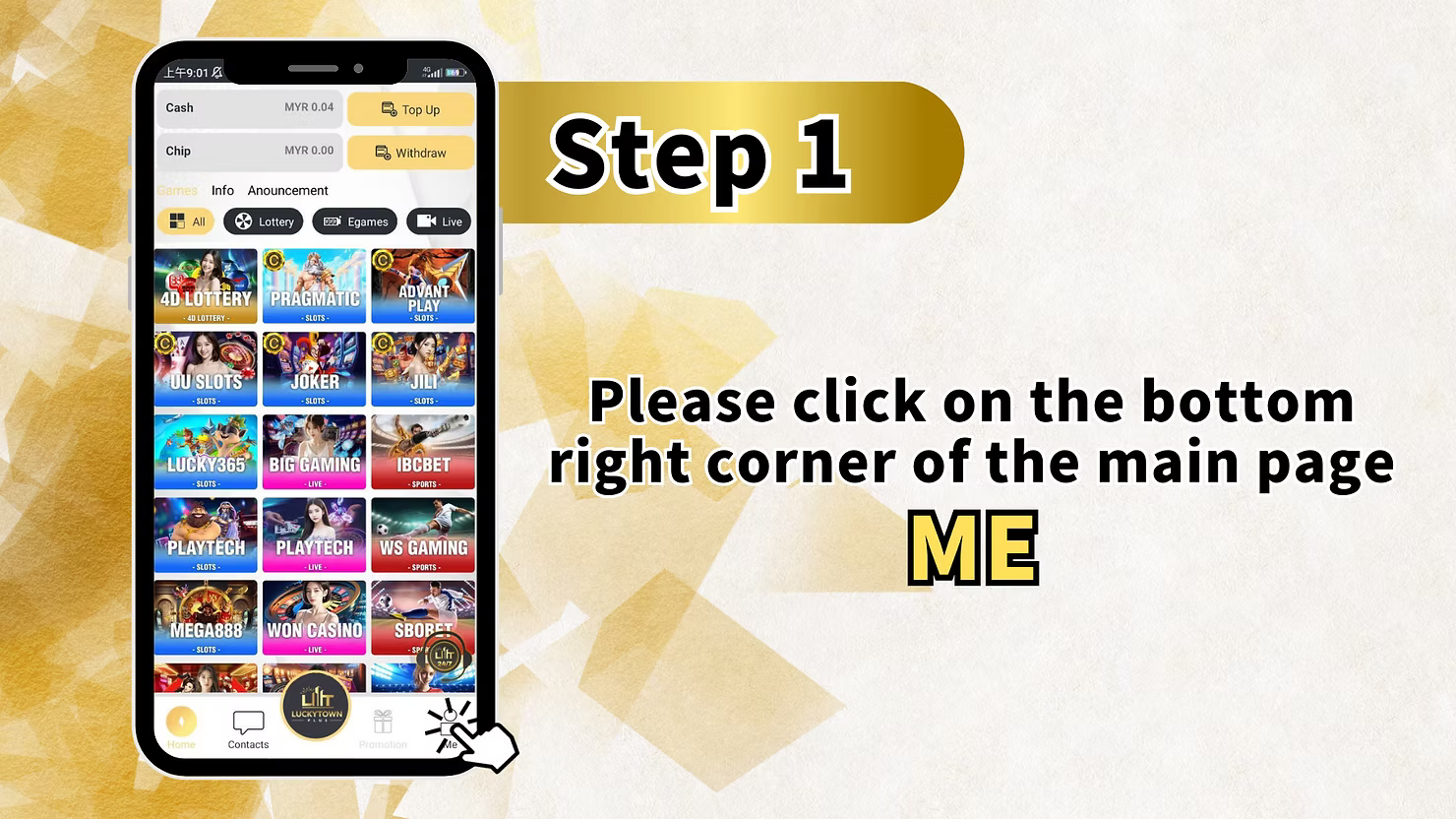
Step 1: Access Your Account Menu
Open the LUCKYTOWN PLUS app. On the main page, tap the bottom right corner to access your account options and dashboard.
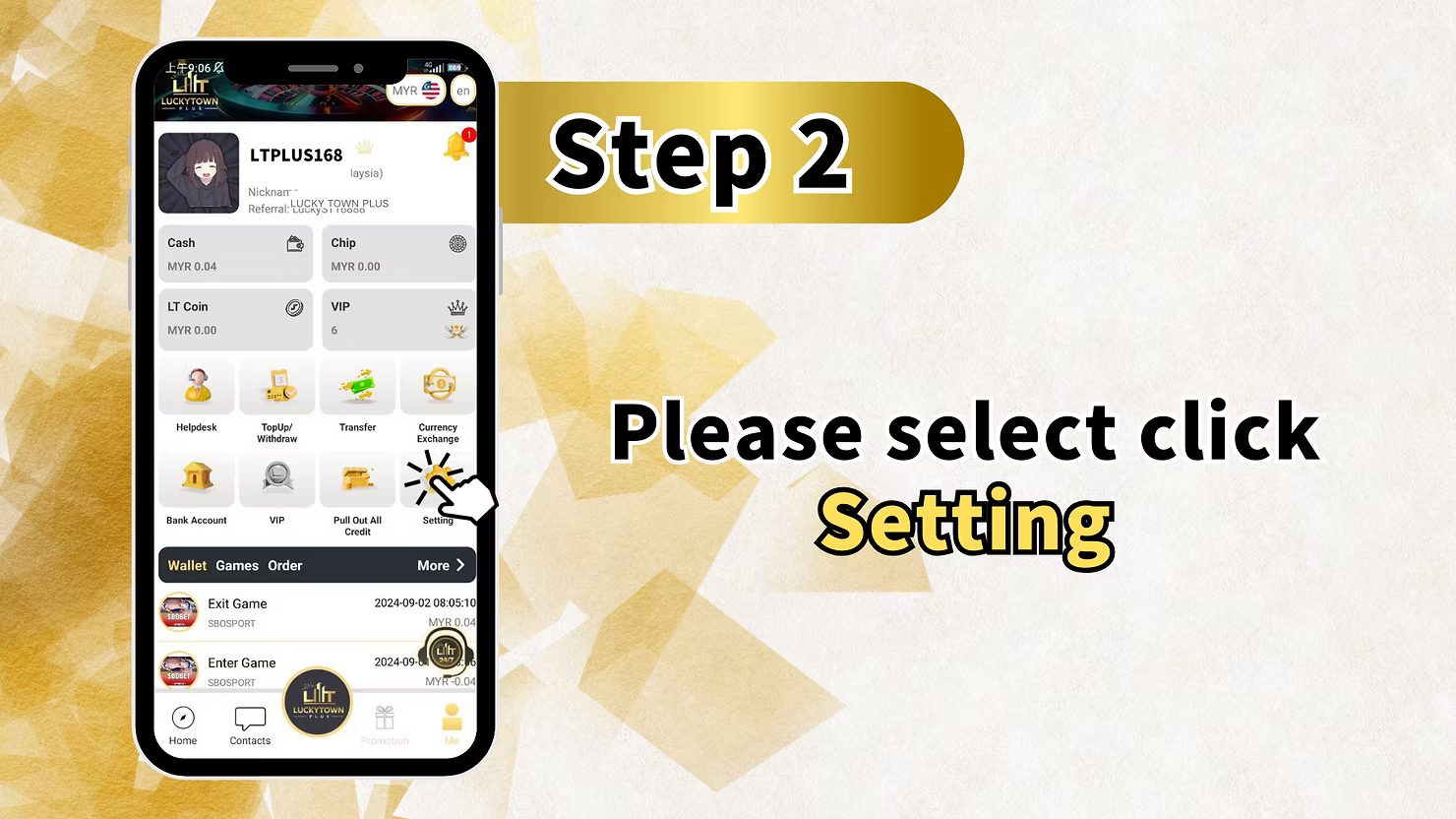
Step 2: Select "Switching" to Access Settings
From the menu, select "Switching". This option will lead you to the account management settings for your LUCKYTOWN PLUS profile.
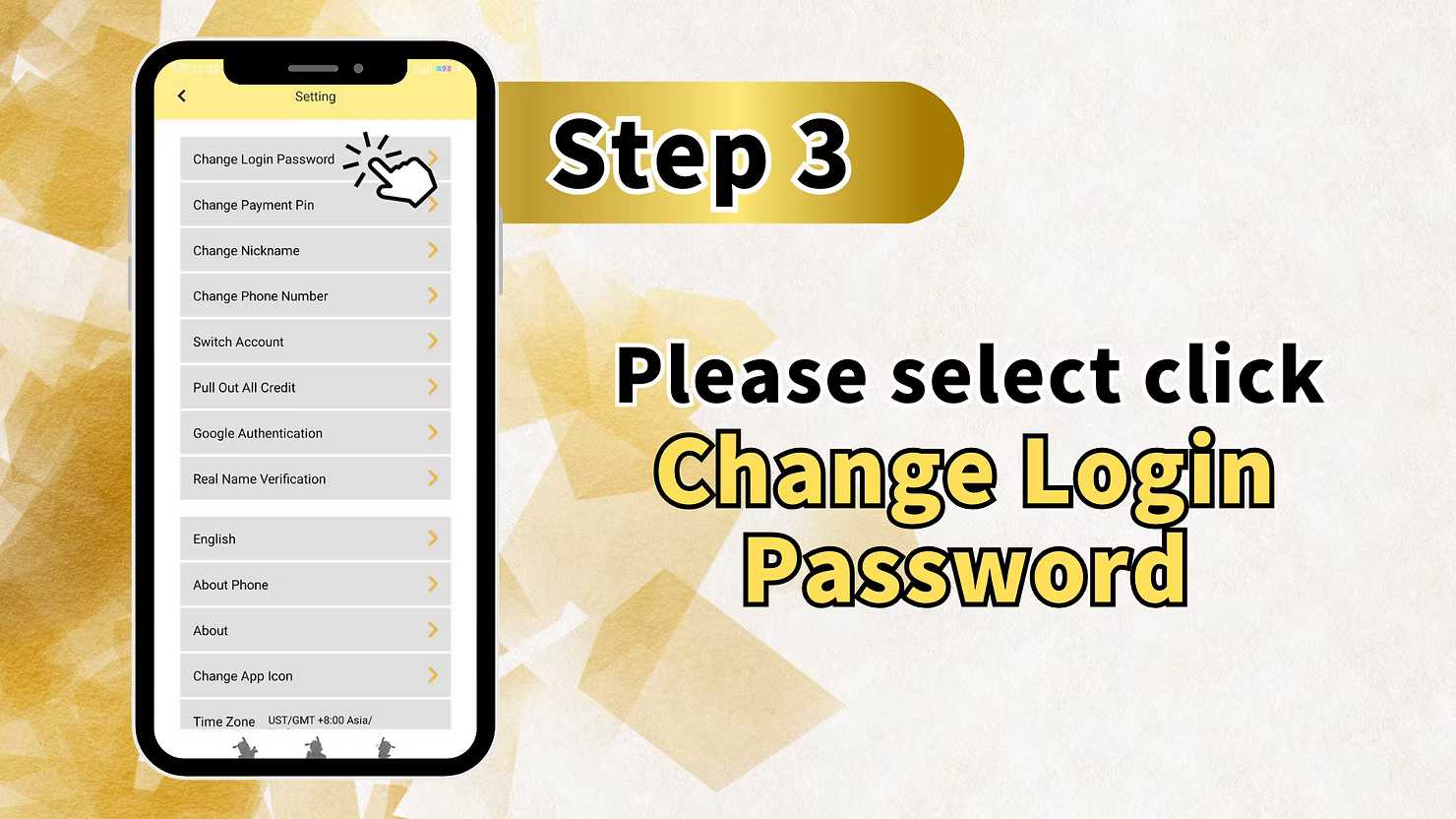
Step 3: Choose "Change Login Password"
Tap on "Change Login Password" to open the interface where you can update your login credentials for LUCKY TOWN.
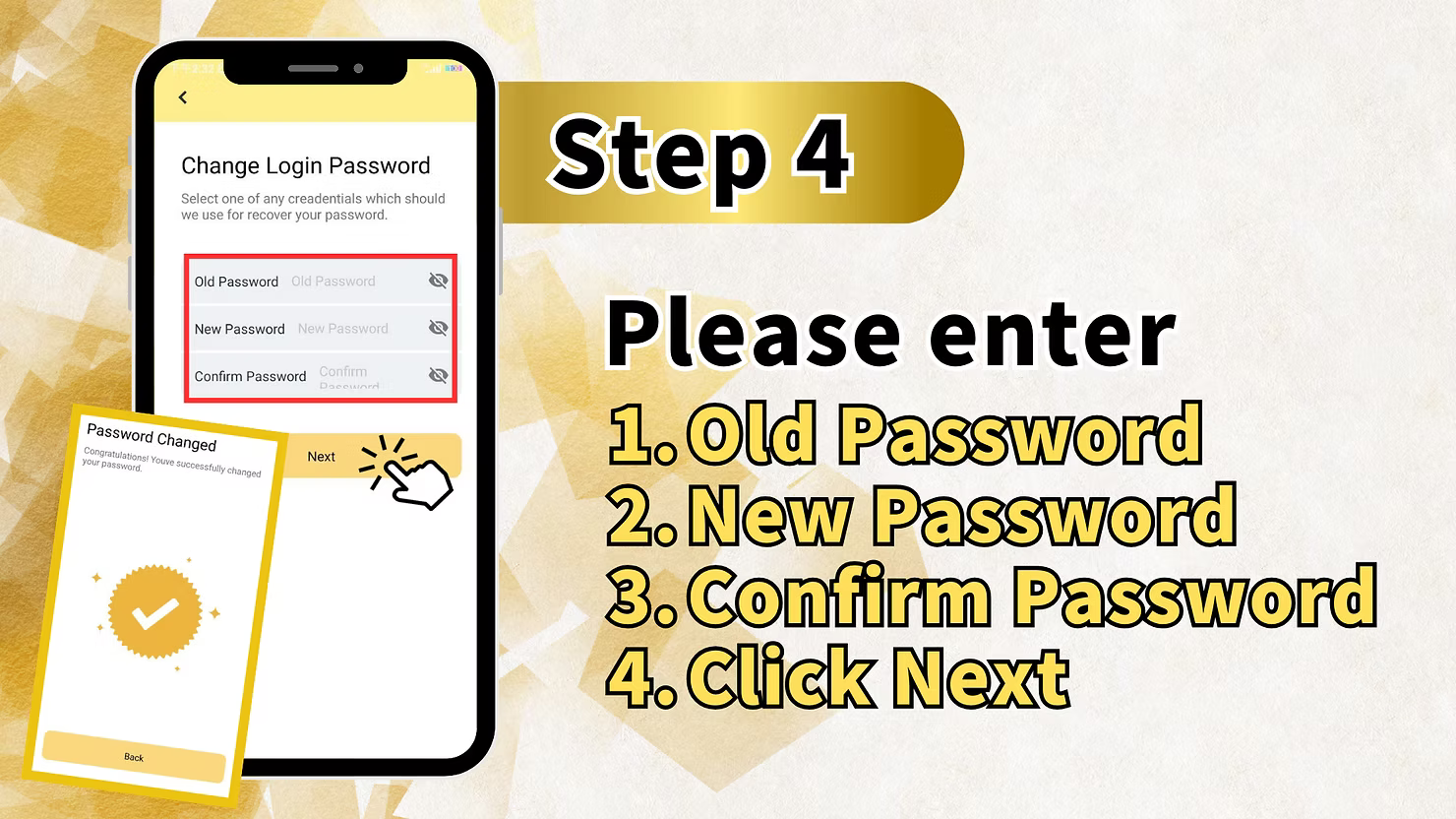
Step 4: Enter Your Current Password
Enter your current password in the required field to verify your identity before making any changes.
Step 5: Set Your New Password
Enter your new, strong password, then re-enter it in the confirmation field. Please follow any security requirements displayed on the screen for a secure LUCKYTOWN PLUS account.
Step 6: Confirm and Save Your New Password
Tap "Submit" or "Confirm" to save your new password. Your LUCKYTOWN PLUS login credentials are now updated.
Method 2: Forgot Password Recovery at LUCKYTOWN PLUS
Step 1: Access the Account Recovery Screen
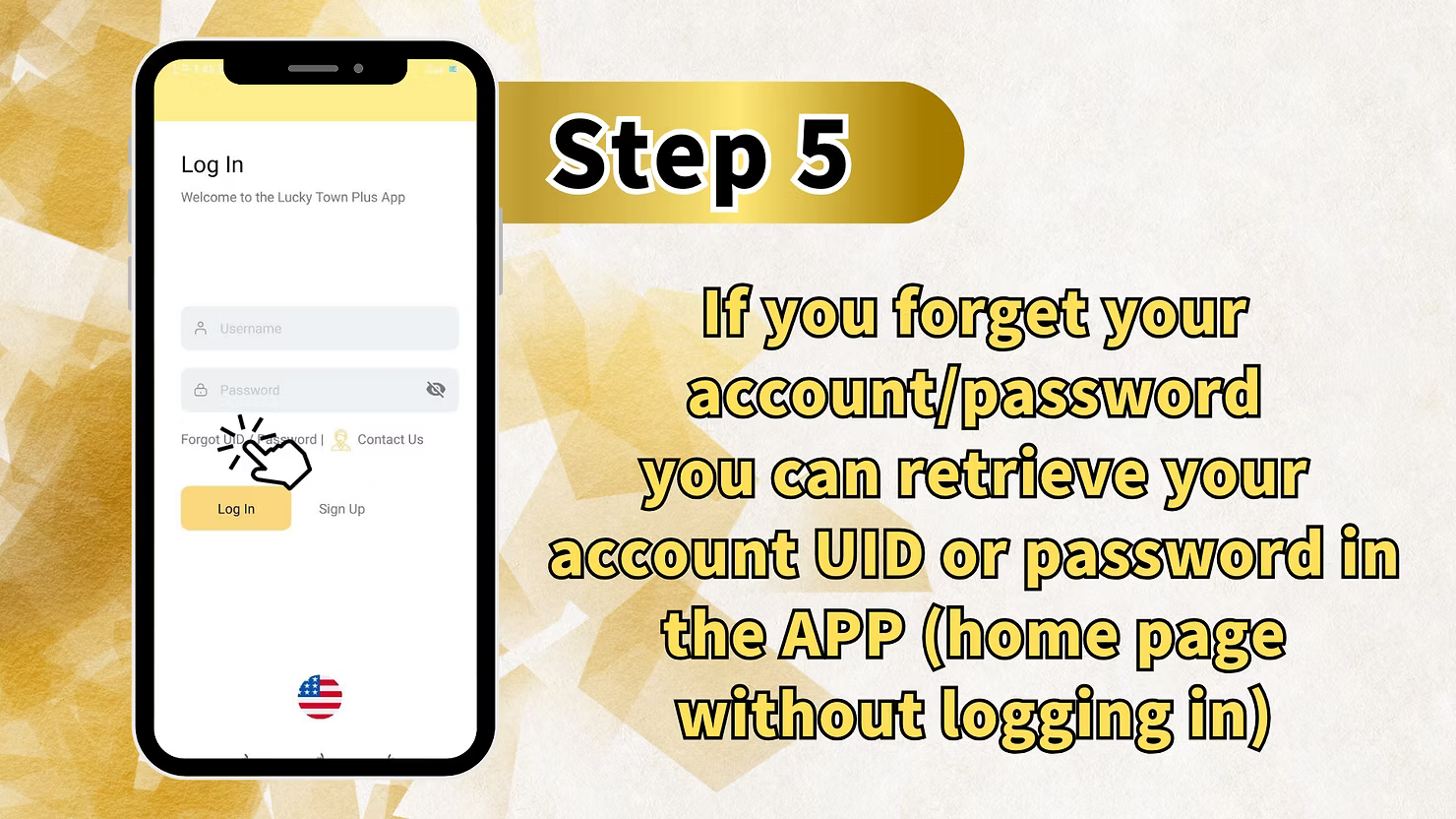
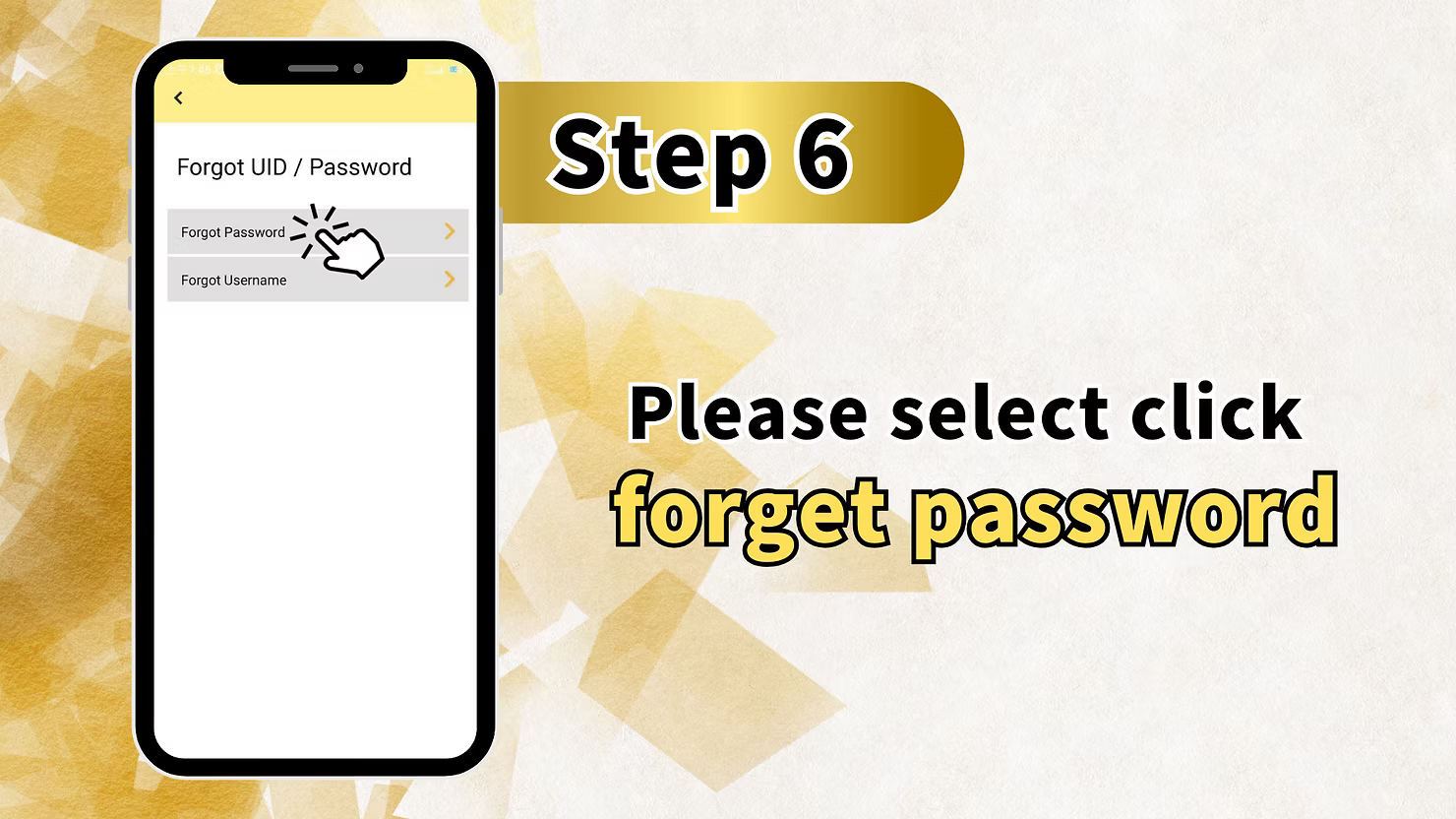
On the LUCKYTOWN PLUS login screen, tap "Forgot UID / Password" and then select "Forgot Password" to begin the recovery process.
Step 2: Enter Your Registered Details
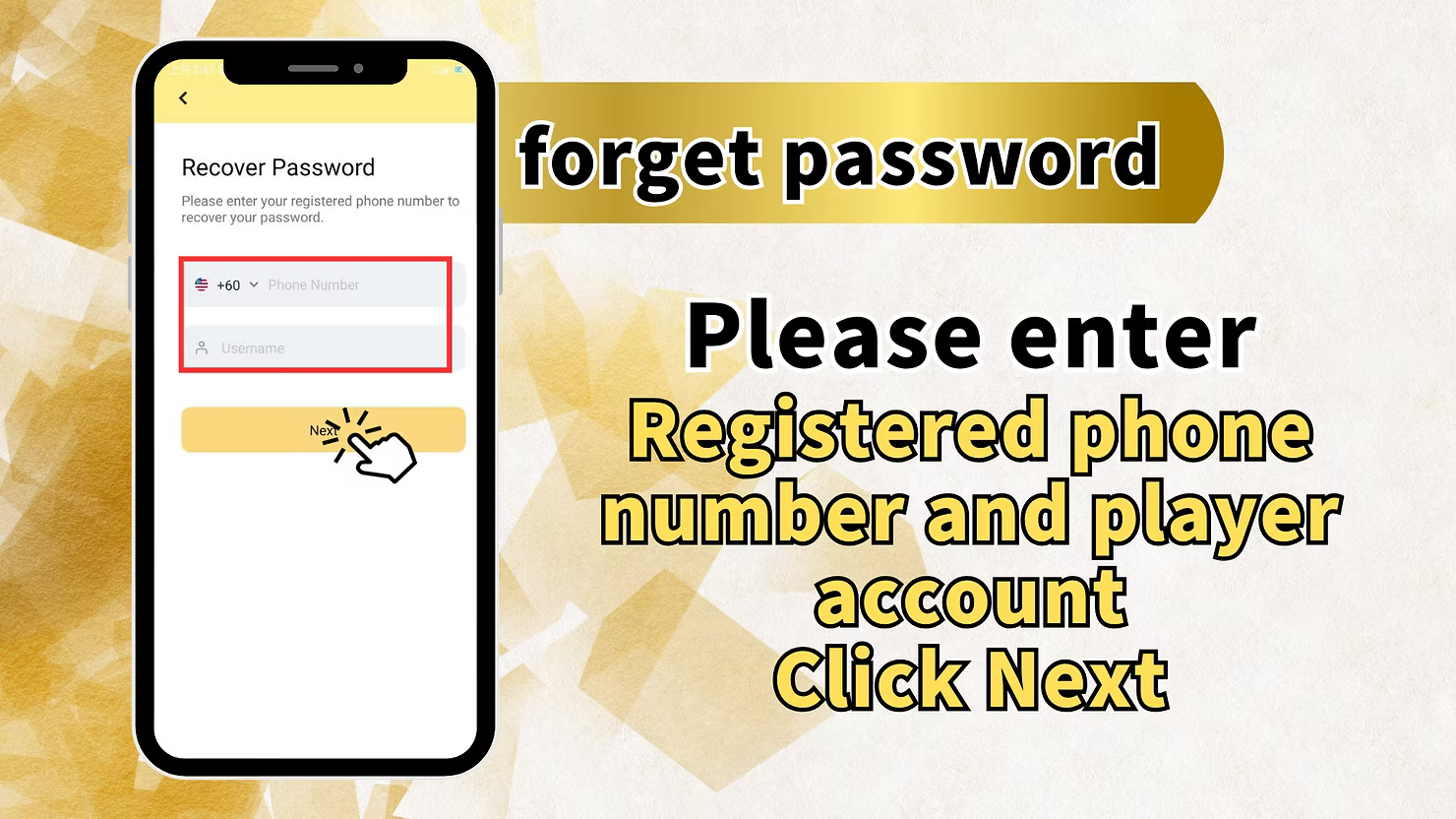
Enter your registered phone number and your player account (username) associated with your LUCKYTOWN PLUS account. Tap "Next" to proceed.
Step 3: Complete OTP Verification
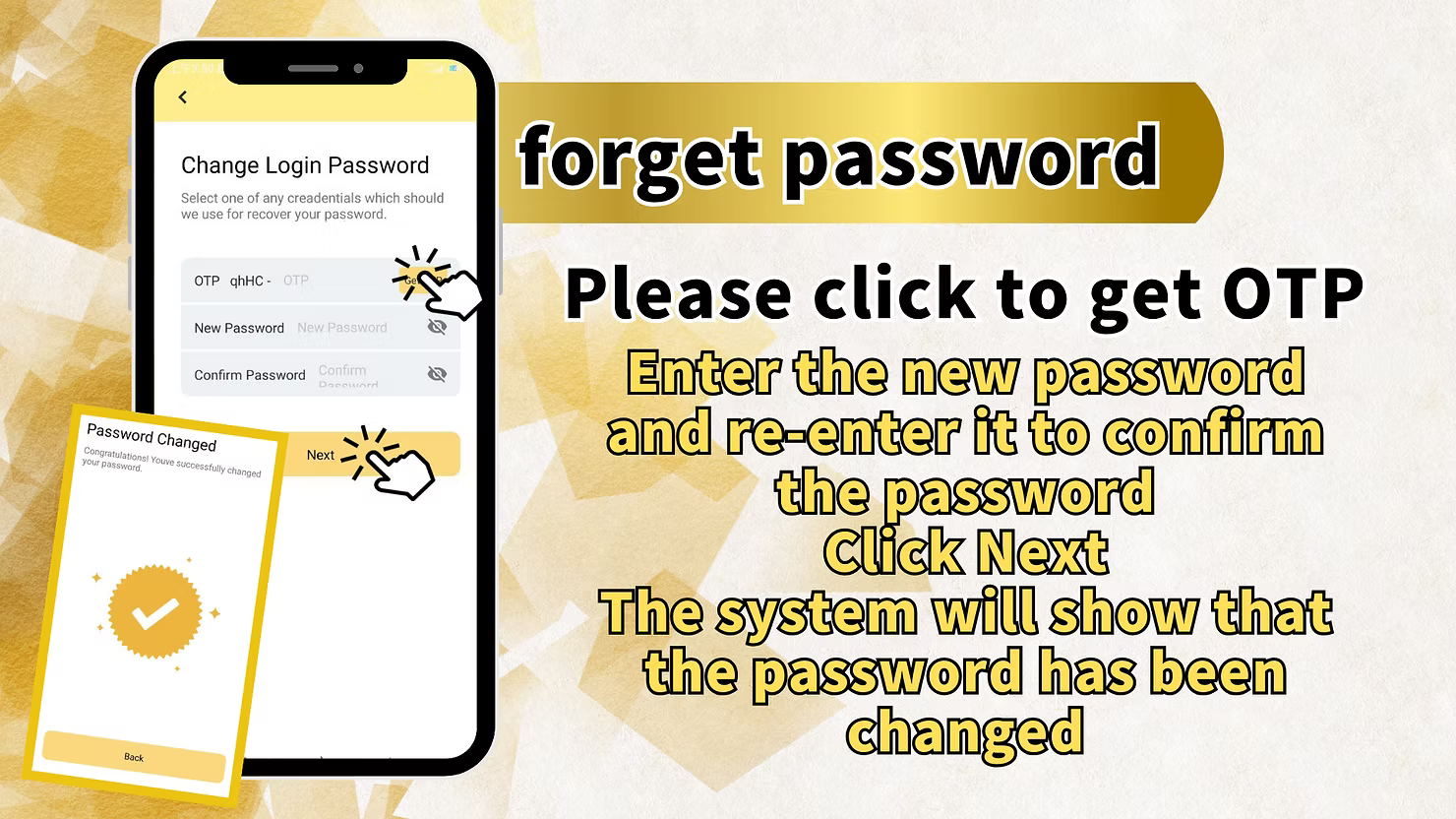
Tap "Get OTP" to receive a one-time verification code via SMS to your registered mobile number. Enter the received OTP in the verification field provided.
Step 4: Set Your New Password
Enter your new password and re-enter it to confirm. Ensure it meets any security guidelines. Tap "Next".
Step 5: Confirmation of Password Change
The LUCKYTOWN PLUS system will confirm that your "password has been changed". You can now log in to your account using your new password.
Method 3: Forgotten Username Recovery at LUCKYTOWN PLUS
Step 1: Access the Account Recovery Screen
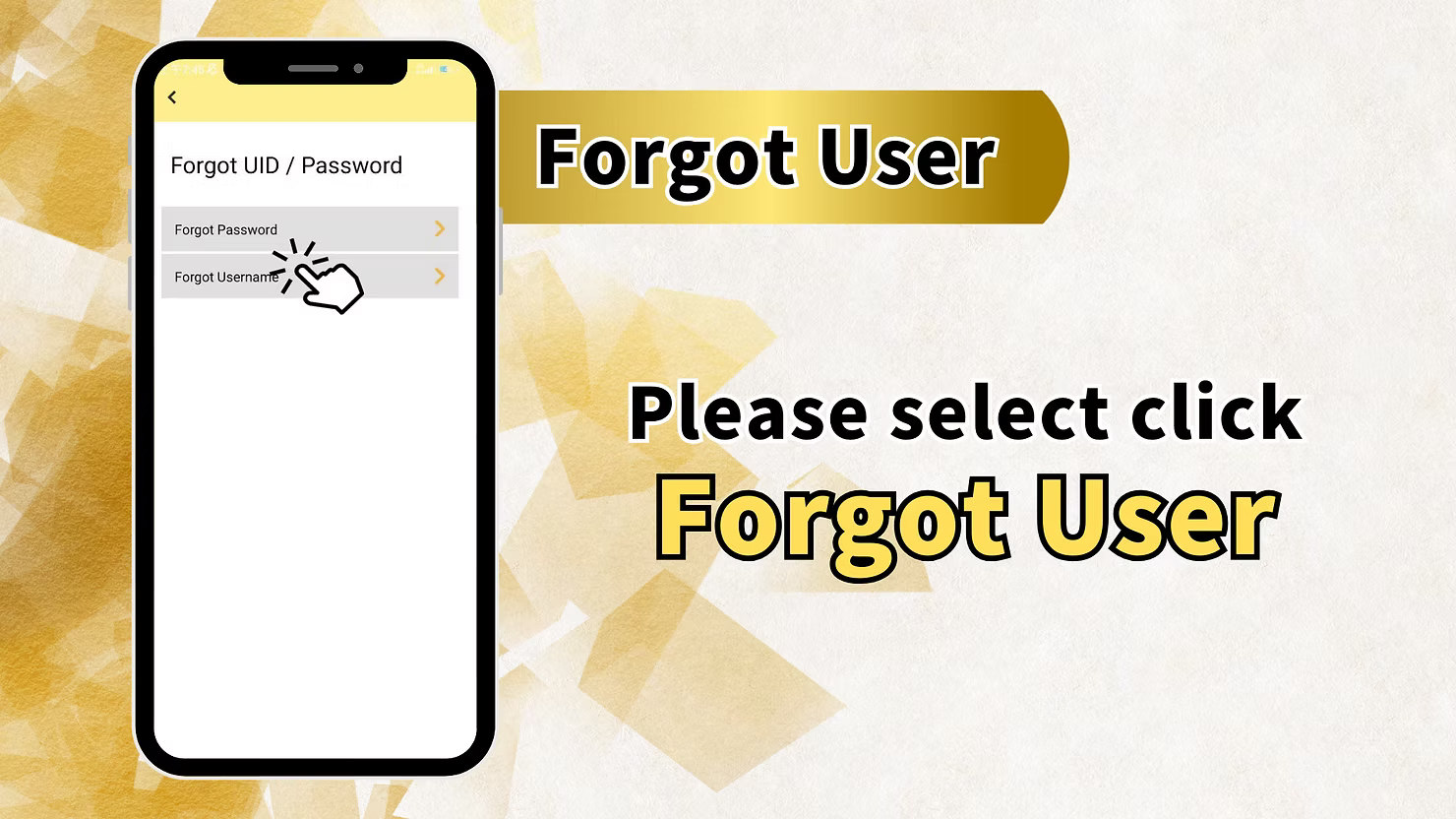
On the LUCKYTOWN PLUS login screen, tap "Forgot UID / Password" and then select "Forgot User" to retrieve your forgotten username.
Step 2: Enter Your Registered Phone Number
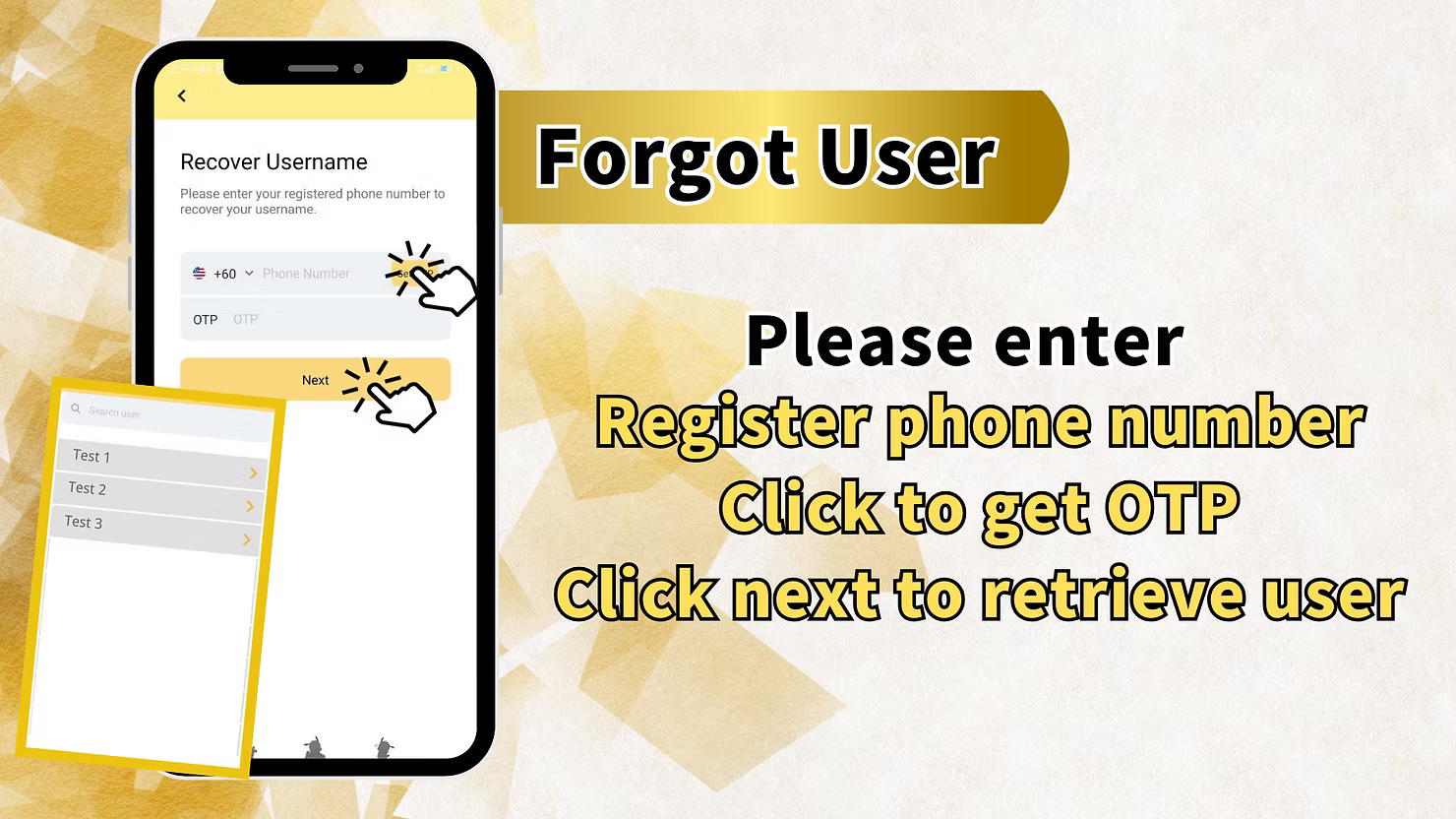
Enter the phone number that is registered and associated with your LUCKYTOWN PLUS account.
Step 3: Complete OTP Verification
Tap "Get OTP" to receive a code via SMS. Enter the OTP in the verification field to confirm your identity.
Step 4: Retrieve and View Your Username
Tap "Next" to successfully retrieve and view your username. You can now use this username to log in to your LUCKYTOWN PLUS account.
Method 4: Reset Password Without Logging In to LUCKYTOWN PLUS
Home Page Password Reset
Go to the LUCKYTOWN PLUS app's home page (without needing to log in). Select the "Reset Password" option, then click "Change Login Password". Follow the on-screen prompts for OTP verification and new password setup to regain access to your LUCKYTOWN PLUS account.
Quick Reference Summary for LUCKYTOWN PLUS Password Management
Change Password (Logged In)
Bottom right → Switching → Change Login Password → Enter current password → Enter new password → Confirm
Forgot Password
Login screen → Forgot UID/Password → Forgot Password → Enter phone + username → Get OTP → Enter OTP → Set new password
Forgot Username
Login screen → Forgot UID/Password → Forgot User → Enter phone → Get OTP → Enter OTP → Retrieve username
Important Notes for Password Management at LUCKYTOWN PLUS
Keep Your LUCKYTOWN PLUS Password Secure
Choose a strong and unique password for your LUCKYTOWN PLUS account. Never share your password with anyone for any reason.
Understand OTP Security
OTP codes are time-sensitive and confidential. Never share them with anyone. LUCKYTOWN PLUS will never ask for your OTP outside of the official, secure account recovery process.
Keep Your Registered Phone Number Updated
Ensure your registered phone number is always current in your LUCKYTOWN PLUS profile, as it is essential for account recovery via OTP verification.
Frequently Asked Questions About Password Changes at LUCKYTOWN PLUS
What if I forget both my password and my username?
Use the "Forgot UID / Password" option on the login screen. You can first retrieve your username via your registered phone number, and then proceed to reset your password.
How long is the OTP code valid for?
OTP codes are typically valid for a short period, usually a few minutes. If your code expires, simply request a new one.
What should I do if I don't receive the OTP code?
First, verify that you entered the correct registered phone number. Check your mobile network reception and SMS inbox (including spam folder). If the issue persists, contact LUCKYTOWN PLUS customer support.
Can I change my password without knowing my old one?
If you do not know your current password, please use the "Forgot Password" recovery process instead of trying to change it while logged in.
What is the "Switching" option in the menu?
"Switching" is the menu option that provides access to various account management features, including the option to change your login password.
Who should I contact if I have issues with account recovery?
If you encounter any problems during the password change or account recovery process, please contact LUCKY TOWN customer support immediately through the app's Helpdesk for prompt assistance.
Manage Your LUCKYTOWN PLUS Password Today!
Keep your LUCKYTOWN PLUS account secure. Follow our comprehensive guide to change your password or recover forgotten login details. The process is fast, secure, and easy to follow!
Change Password at LUCKYTOWN PLUS